
Getting Started with Your Wiley Magic Box & Other Phone
Welcome to Wiley! This guide walks you through everything from unboxing to your first phone call.
Quick Summary
- Unbox your Wiley Magic Box device and find the MAC address on the bottom label.
- Sign up at the Wiley parent portal using the MAC address (found on the bottom of the device)
- Complete setup — enter your address and payment details.
- Plug in Wiley's Magic Box into power
- Plug in the included Ethernet cable into Wiley's Magic Box (blue label) into your home internet router and wait 3–5 minutes for it to configure itself.
- Plug your analog phone with a telephone cord into Wiley's Magic Box (green label).
- Start calling!
What's in the Box
- Wiley Magic Box
- Power adapter
- Ethernet cable (for initial setup if needed)
- Quick start card
Step 1: Find Your MAC Address
The MAC address is a unique identifier for your Wiley Magic Box. You'll need it during signup.
Where to find it:
- On the bottom label of Wiley's Magic Box — it looks like
C0:74:AD:xx:xx:xx(also found on the **original box** the device came in)
Step 2: Create Your Account
- Go to the Wiley parent portal.
- Enter the MAC address from Wiley's Magic Box.
- Choose your plan (Monthly at $9.95/month or Yearly at $99/year).
- Enter your payment information.
- Provide your home address (required for 911 service), select your own home phone number with a local area code.
Step 3: Connect Wiley's Magic Box To Your Home Internet Router With Ethernet Cable
Wiley's Magic Box doesn't use WiFi, it connects directly to your internet with an Ethernet cable.
-
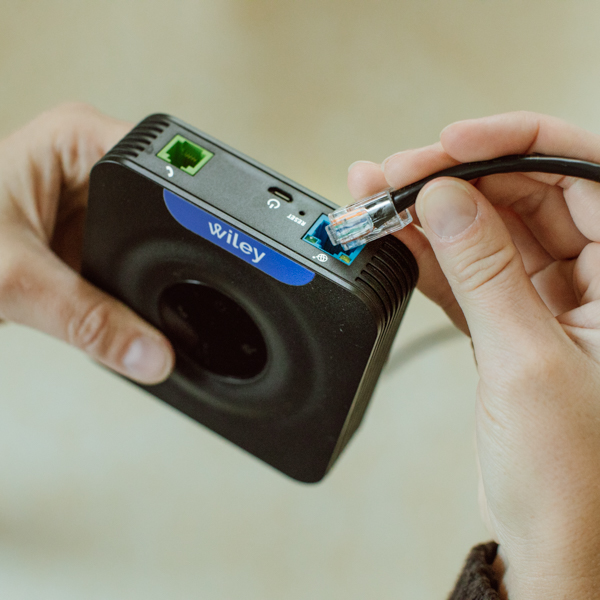
Connect your included Ethernet cord into Wiley Magic Box's port (surrounded in Blue) until you hear a click ensuring a snug fit.
-
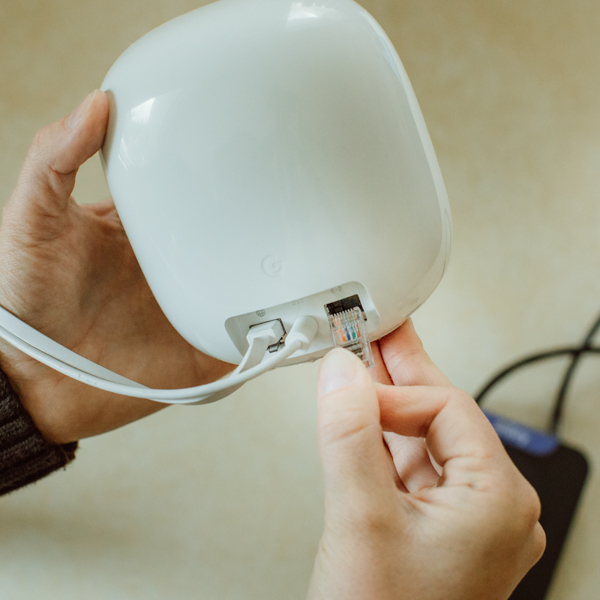
Connect the other end of the Ethernet cord to your Home Internet Router. It'll be a port that may be surrounded in yellow or have a symbol like the following. If one port seems to not work, try another.
| Ports To Use | Ports To Not Use |
|
|
LAN |
|
|
WAN |
| Port that says "Ethernet" |
|


Still unsure what port to use? Here's a video if you need help.You can also plug into any Ethernet port with active internet if your residence is wired with active Ethernet. (be cautious here as some homes have a port installed into the wall but it isn't actually connected to your home internet)
Step 4: Plug In Wiley's Magic Box To Power
- Connect the power adapter to your Wiley's Magic Box and plug it into a wall outlet.
- Wait 2-3 minutes. Wiley's Magic Box will automatically connect to your home internet and download its configuration.
- You'll see three lights on Wiley's Magic Box light up, that's when you know it's ready.

If Wiley's Magic Box doesn't connect after 3 minutes:
Double check your Ethernet cable is connected to Wiley's Magic Box and a port on the back of your home internet router. Some home internet routers have multiple ports, make sure you are connected into a port that supplies internet to external devices, not a ethernet port that supplies internet TO the router itself.
Step 5: Connect Your Analog Phone To Wiley's Magic Box With Telephone Cable
Step 6: Make Your First Call
Once Wiley's Magic Box shows three blue lights:
- Pick up the handset of your phone.
- Dial a number!
FAQ
I don't have a good spot to connect to my home internet router.
This is a common issue yet you have options.
- You can get a WiFi extender with an Ethernet port and connect to it.
- Consider a Wiley Buddy (WiFi Enabled)
- Wiley's Magic Box needs to be connected to your Home Internet Router via Ethernet cord. Yet you can run a telephone cord to where you want the phone. We even know a family that has a internet router in their closet but had a contractor draw a telephone line to the spot they want the phone in their kitchen. They really wanted to have the vintage phone set up to fit the vibe...props to them!
What phone do I pick to use with the Magic Box?
Make sure you pick a fully functioning analog phone, new or old.
Buying New Analog Phones You shouldn't have issues.
Buying Vintage Analog Phones If buying vintage, it can be a gamble but there are ways to ensure you are buying a fully functioning phone. For instance on eBay if the listing says, "not tested"...don't buy it. If the seller can't confirm it works why buy it?
Look for listings that say "fully tested & working". You will pay more generally but won't run the risk of a phone showing up and it not working.
What's Next?
- Set up your contacts — control who your child can call and receive calls from.
- Configure quiet hours — set times when Wiley's Magic Box won't ring.
- Set up speed dial — assign family members to quick-dial keys.
- Customize voicemail — record a greeting and learn how to check messages.